
Lifesum App Review: Track Calories and Nutrients Easily
Overview of Lifesum
Lifesum is a mobile application available on both iOS and Android platforms that helps users monitor their dietary intake, physical activity, and hydration levels. The app offers a comprehensive approach to tracking health by allowing users to log the food they consume, the calories they burn, and the water they drink throughout the day. Some features, such as calorie expenditure, can be automatically synchronized with devices like the Apple Watch. This integration ensures that data from workouts, walking, and daily activities tracked by Apple Health are instantly reflected in Lifesum.
While the app does not automatically log all food and water consumption, it simplifies this process for users. Unlike many other similar apps, Lifesum does not just ask for basic information like height and weight before assigning an arbitrary calorie goal. Instead, it uses a "Life quiz" that asks about eating habits, including how often certain foods like vegetables and seafood are consumed. Users also set personal goals, whether related to weight loss, muscle building, or other objectives. The quiz is detailed and can be retaken at any time, enabling users to track changes in their "Life score" over time. From there, the app helps users create personalized goals that include daily calorie intake, fiber, and protein requirements.
Visual Feedback and User Experience
When users input food that aligns with their goals, Lifesum provides a visual cue in the form of a smiley face. Foods that are less aligned with the user’s goals may result in a neutral or frowny face, but these reactions are designed to be gentle rather than discouraging. The app also includes text-based feedback, encouraging users to make healthier choices in subsequent meals. For instance, if a meal lacks sufficient fiber, the app might suggest adding more fiber-rich foods next time.
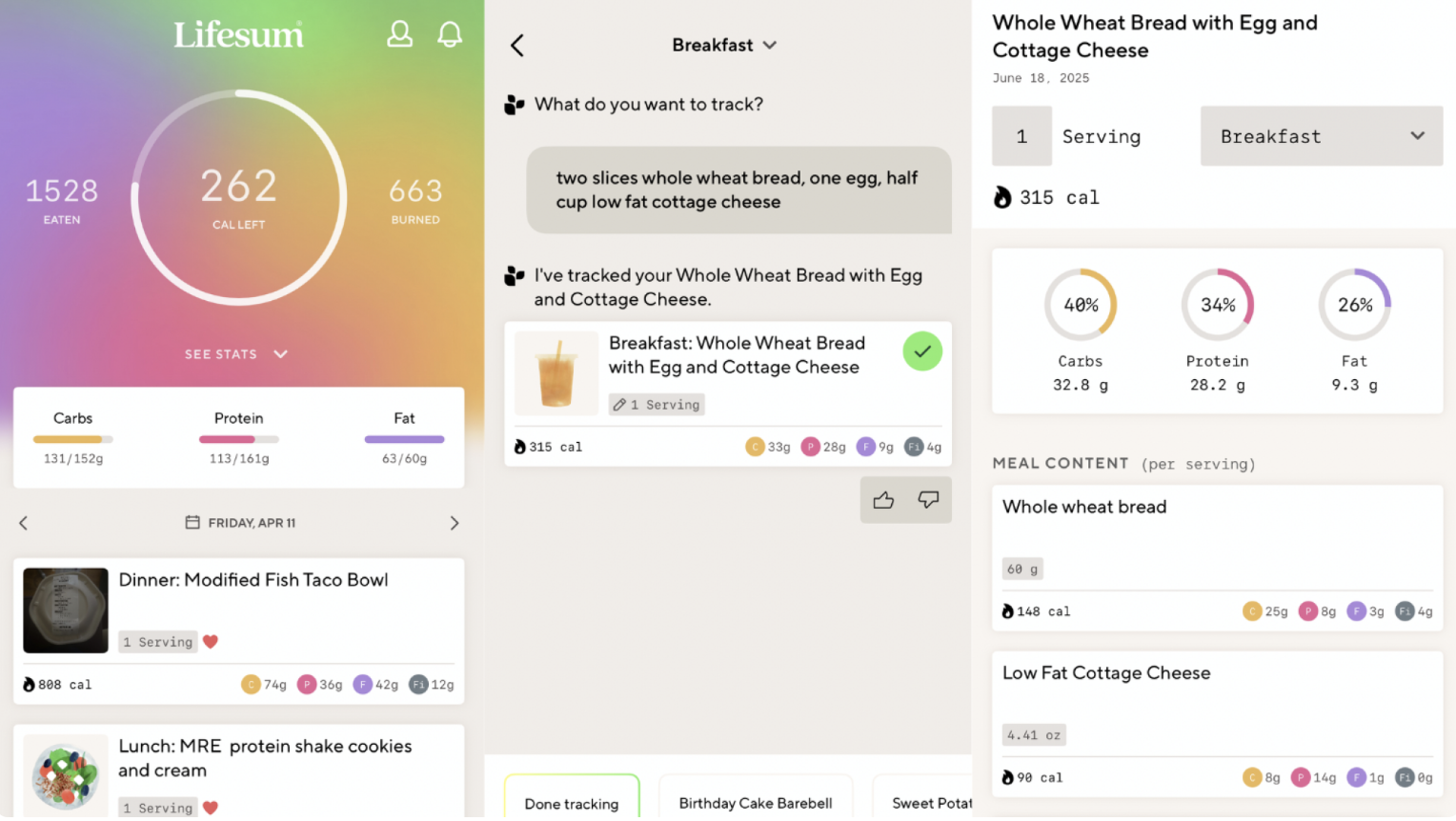
The app also provides valuable data insights. Users can access the "See Stats" feature under the "Diary" tab to review their progress over a specific day or week. Tapping on "Progress" reveals more detailed information and suggestions for improvement. Since the app is linked to the Apple Watch, factors like sleep quality and duration are also considered in calculating the weekly Life Score. This holistic approach helps users understand how various aspects of their lifestyle contribute to their overall well-being.
Tracking Intake with Lifesum
Tracking food and water intake with Lifesum is straightforward. A widget on the home screen allows users to quickly log water consumption. To add food entries, users tap the "+" icon at the bottom of the app's interface. This action brings up several options: Barcode, Quick Track, Image, Text, and Voice.
The Barcode method is the most intuitive and accurate, as it involves scanning the product's barcode and adjusting the serving size. Quick Track offers a list of frequently consumed foods, making it easier to log them quickly. The Image, Text, and Voice options rely on AI to estimate nutritional values based on photos or voice commands. While these methods are convenient, they are generally less precise than the Barcode option.
Users should not expect perfect accuracy from these AI-driven features, and that’s okay. Many find it more beneficial to have a general sense of their nutritional intake rather than exact measurements. For example, when logging a meal of salmon, rice, greens, sweet potato, and corn, the app may not capture the exact portions or preparation methods, but it still recognizes the main components of the meal. This level of approximation is sufficient for many users who prefer a more flexible approach to tracking.
Search Function Challenges
One area where Lifesum could improve is its search function. Sometimes, the app misidentifies foods due to limitations in its AI. For instance, a David protein bar might be incorrectly recognized as a slice of cake. These inconsistencies require users to double-check entries and adjust them manually. While this can be slightly inconvenient, it doesn’t detract significantly from the overall user experience.
Why I Love Lifesum
I enjoy tracking my health data and have become increasingly meticulous about my exercise and nutrition. Lifesum fits seamlessly into my daily routine. Its simple navigation makes it easy to use without spending excessive time searching for foods. I appreciate the ability to modify my goals at any time and the fact that the app considers more than just calories. It never shames users for missing a day or exceeding a calorie or fat goal, which is a refreshing contrast to some competing apps that leave users feeling discouraged.
The pricing model is also appealing. Lifesum costs $99.99 per year, $29.99 every three months, or $7.49 per month. I opt for the quarterly plan and have renewed without hesitation. While basic food tracking is free, premium features like recipes, meal plans, detailed macro tracking, and integration with the Health app require a subscription. Overall, Lifesum offers a balanced combination of functionality, ease of use, and affordability that makes it a standout choice for health-conscious individuals.

Post a Comment for "Lifesum App Review: Track Calories and Nutrients Easily"
Post a Comment