
Zoner Studio Photo Editor Unveiled
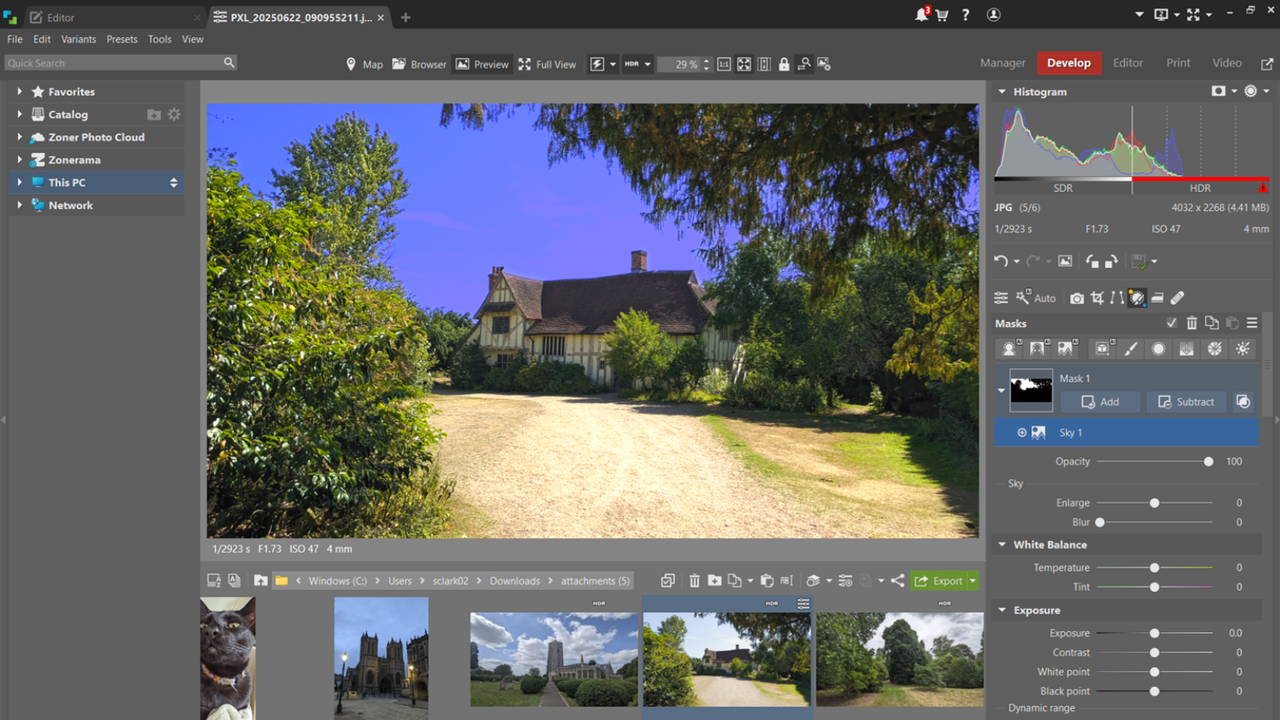
Overview of Zoner Studio
Zoner Studio is a Windows-only photo editing and organizing tool that serves as an alternative to both Photoshop and Lightroom. While it may not be as powerful as these industry leaders, it offers a robust set of features for entry-level and intermediate users at a more affordable price point. The software has undergone a recent rebranding from Zoner Photo Studio X to Zoner Studio, which the company claims better reflects its broader functionality.
When considering alternatives to Adobe Photoshop, Zoner Studio presents a compelling option, especially for those who are looking for a budget-friendly solution without sacrificing essential tools. The latest version of the software was tested to evaluate how it stacks up against other top contenders in the market.
Pricing and Plans
Zoner Studio is available through a monthly subscription model priced at $5.99 or an annual plan for $59. A family plan, allowing multiple users within the same household to access the app, is also available at $9.98 per month or $98 annually.
One of the key advantages of Zoner Studio is its affordability compared to Adobe's Creative Cloud suite, which costs $22.99 per month for the Photoshop and Lightroom Photography plan. Another competitor, Affinity Photo, offers a one-time purchase at $70. However, Zoner Studio’s pricing structure makes it particularly appealing for those who are not ready to commit to a high-cost subscription.
It is important to note that Zoner Studio is exclusively available on Windows machines, which may limit its appeal for users of other operating systems. Additionally, it caters more to entry-level and intermediate users rather than professionals who require advanced features found in Photoshop or Affinity Photo.
First Impressions
Navigating Zoner Studio is straightforward for those familiar with photo editing software. For newcomers, the interface is still relatively easy to understand, making it a welcoming choice for those looking to enhance their photographs without a steep learning curve.
The main screen displays the selected image, with files and folders located beneath it. This layout allows for easy navigation using the mouse. On the right side of the screen, there are five primary options: Manager, Develop, Editor, Print, and Video. Each of these tabs serves a specific function, such as organizing photos, editing RAW images, or applying adjustments.
Non-destructive editing is supported, allowing users to experiment with tools without altering the original file. This feature is particularly useful for beginners who are still learning the ropes of photo editing.
In-Use Experience
Using Zoner Studio is not overly complex, but it can feel overwhelming for new users due to the variety of tools available. Hovering over the side-panel icons provides additional information about each tool, which can help users understand their functions better.
Photos automatically appear in Zoner Studio through the file explorer tab on the left side of the screen. An import function is also available along the ribbon, though many users may find the automatic display sufficient.
Editing photos involves selecting the desired image and then accessing the Editor tab for adjustments. The software includes a wide range of tools, such as cropping, rotating, adding watermarks, and applying directional blurring. Users can also tweak exposure, white balance, and color settings. The tone curve feature, similar to what is found in Lightroom, allows for fine-tuning of light and color channels.
For those seeking a streamlined workflow, Quick Edit, Quick Fix, and Quick Filters offer instant access to core tools, making the editing process more efficient. These features are especially beneficial for social media users who need to make quick adjustments.
AI-Powered Tools
Zoner Studio incorporates several AI-powered tools that deliver impressive results quickly. One standout feature is AI Masking, which allows the software to automatically select subjects, backgrounds, objects, or skies for further adjustments. This can significantly streamline the editing process for users.
Another notable feature is the AI Background Remover, which works well for most images. After removing the background, users can add a custom color or create a transparent background for compositing purposes. While there are occasional issues with removing parts of the subject, especially on dark or similarly colored backgrounds, the overall performance is satisfactory.
Limitations
Despite its strengths, Zoner Studio has some limitations that may affect its appeal for certain users. One significant drawback is the lack of support for .PSD files, which are commonly used in Photoshop. Instead, the software uses its own .ZPS file format, which supports layers and effects but does not allow for importing or exporting Photoshop files.
Should You Buy Zoner Studio?
Zoner Studio is a great choice for those new to photo editing who want access to a wide range of powerful tools. It is also an excellent option for users who do not want to spend a lot on premium software.
However, if you're looking for a basic app for simple tasks like cropping or brightening images, there may be more suitable alternatives. Similarly, if you require professional-level software that delivers the best results, Photoshop or Lightroom may be more appropriate choices.

Post a Comment for "Zoner Studio Photo Editor Unveiled"
Post a Comment