
LG Smart Monitor Swing Unboxing and Review
Design
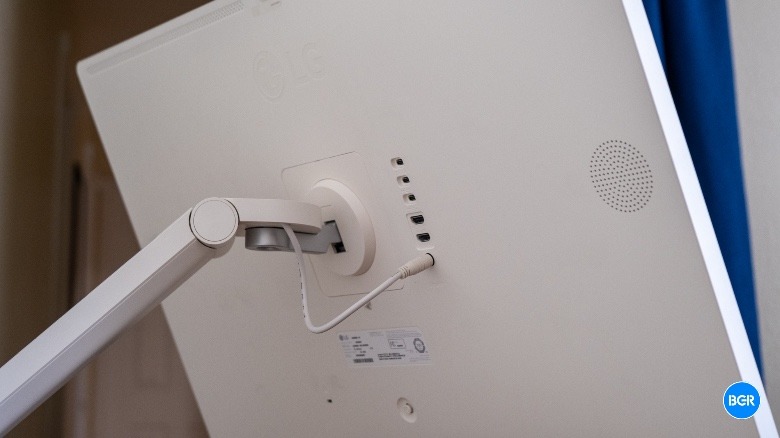
The design of the LG Smart Monitor Swing is perhaps the most intriguing aspect of this product. It’s not just a standard LG monitor mounted on a stand; instead, the entire unit is designed to look cohesive, with a white plastic back that matches the rest of the stand and base.
Setting it up is relatively straightforward. The base comes mostly assembled, and all you need to do is place the power brick inside, attach the large arm using four screws, and then secure the cover on the base. After that, you take out the monitor and snap it into place on the arm before plugging in the power cable, which is built into the arm itself. One end connects to the main power brick in the base, while the other connects directly to the monitor.
Once everything is set up, you have a lot of flexibility in how you position the monitor. You can move it forward or backward, swing it side to side, adjust its angle, and change the height. It also supports switching between vertical and horizontal orientation, though it only turns one way to prevent the power cable from tangling.
From the back of the base extends a power cable that needs to be plugged into an outlet for the Smart Monitor Swing to function. Unlike the StanbyME and StanbyME 2, it doesn’t have a built-in battery, so you can't use it while moving it around the house. Once it's in place, however, it works well.
The white plastic used for the majority of the product isn’t the most premium material, but it’s not bad either. Some of the plastic panels didn’t align perfectly with the edges of the monitor, but that was easy to overlook. Overall, the Smart Monitor Swing felt solid and well-made. The wheels were smooth and never locked up, reducing the risk of it tipping over.
On the back of the monitor, there are multiple ports: three USB-C ports (one supporting 65W power delivery), two HDMI ports (one being an eARC port), and a magnetic pogo pin port for a webcam. However, there’s no webcam included in the box—you’ll need to purchase one separately.
Also included in the box is a remote, made from the same white plastic, which offers all the necessary buttons and features to control the software. It includes quick controls for streaming services like Netflix, Prime Video, Disney+, and Sling, as well as a button for LG Channels. It’s not the Magic Remote that comes with some modern LG TVs, though the Smart Monitor Swing does support the Magic Remote if you buy it separately.
Features And Software
Beyond its unique form-factor, the Smart Monitor Swing offers several features to enhance its versatility. It’s a smart monitor, meaning it runs LG’s webOS software directly on the device. This is the same software found on LG TVs, though its performance may vary depending on your expectations.
In general, webOS is functional but not exceptional. It can feel a bit cluttered and challenging to navigate, especially for occasional users. While you may get used to it over time, those who don’t use it frequently might find themselves struggling to locate specific features and settings due to unfamiliarity.
The software also has a low resolution, which is more noticeable on a monitor than on a TV. While the screen is 4K and looks crisp when not using the built-in software, the interface appears blurry, making graphical elements like streaming service logos look less sharp. I wish LG had optimized webOS to fully leverage the higher resolution.
The Smart Monitor Swing also includes a touchscreen, which is a nice touch. However, it doesn’t feel as responsive as a smartphone. At times, the software reacts sluggishly to touch input, requiring you to wait a second or two before it registers your actions. This could impact the overall user experience.
The monitor can connect to other devices through the ports on the back, and it also supports wireless technologies such as Apple’s AirPlay 2, Share Screen, and Bluetooth. Additionally, it can be controlled via the LG ThinQ smart home app, which functions as a remote for the Smart Monitor Swing.
Display
The display on the LG Smart Monitor Swing measures 31.5 inches, has a 4K resolution, and refreshes at 60Hz. While it’s a decent screen, it’s not particularly impressive. I would have preferred something a bit more advanced.
One of my main frustrations with the screen is its ultra-glossy glass. If you’re concerned about reflections in a living room or office, you might avoid placing the monitor near windows or lights. However, since the Smart Monitor Swing is designed to be mobile, dealing with reflections is inevitable. The glare was so intense that it made it difficult to see elements on the display, even at full brightness.
This issue could have been mitigated by using anti-glare glass, as seen on some modern iPad models and higher-end LG TVs. Alternatively, a brighter display would have helped. The current brightness level isn’t very impressive.
Of course, the low brightness and glare aren’t as problematic if the monitor isn’t facing a window or light source. In that case, it still looks decent, though not outstanding. It’s not an OLED screen, so you won’t get deep black levels, but it is reasonably colorful, even if the color accuracy isn’t perfect.
Overall, the display does the job, but not exceptionally well. The only real advantage it has over the StanbyME 2 is its 4K resolution.
Audio
Audio is an important consideration for a product like this, especially since having to move a sound system defeats the purpose of a monitor on wheels. The Smart Monitor Swing comes with two 5W speakers, but they don’t perform well. They produce almost no bass, and while there’s more high-end than bass, the result is a mid-heavy mess that even a small portable speaker could outperform.
The only slight advantage is that the speakers are stereo, providing a bit more spatial separation in the mix, allowing you to hear certain elements a little better. However, if you plan to watch movies or play games, you might still need to bring a separate sound system or use Bluetooth headphones, which the monitor does support.
Conclusions
The LG Smart Monitor Swing isn’t designed for gamers or graphic designers. Instead, it’s a lifestyle product that performs reasonably well for those looking for a monitor or TV they can easily move around their home or office. Its smart features add versatility, but I wish it did a better job of reducing glare.
The Competition
The competition for the Smart Monitor Swing is limited, primarily consisting of LG’s own StanbyME 2 or simply purchasing a smart monitor and mounting it on a generic stand with wheels. The StanbyME 2 has a lower resolution but is more versatile thanks to its built-in battery and detachable design.
If you're looking for display quality, you can certainly find better options at the same price. For example, a similar articulating stand with wheels can be found on Amazon for around $300, leaving $1,000 for the monitor itself. With that money, you could get an ultra-high-end OLED monitor, a super-bright gaming monitor, or an anti-glare monitor. Most of these options would sacrifice touchscreen support, though.
Should I Buy the LG Smart Monitor Swing?
Maybe, but only if you can think of a specific use case for it in your life and you don’t mind lower display quality and sub-par audio.

Post a Comment for "LG Smart Monitor Swing Unboxing and Review"
Post a Comment