
Icons8 Face Swapper: The Practitioner's Field-Tested Guide
Executive Summary You Can Act On
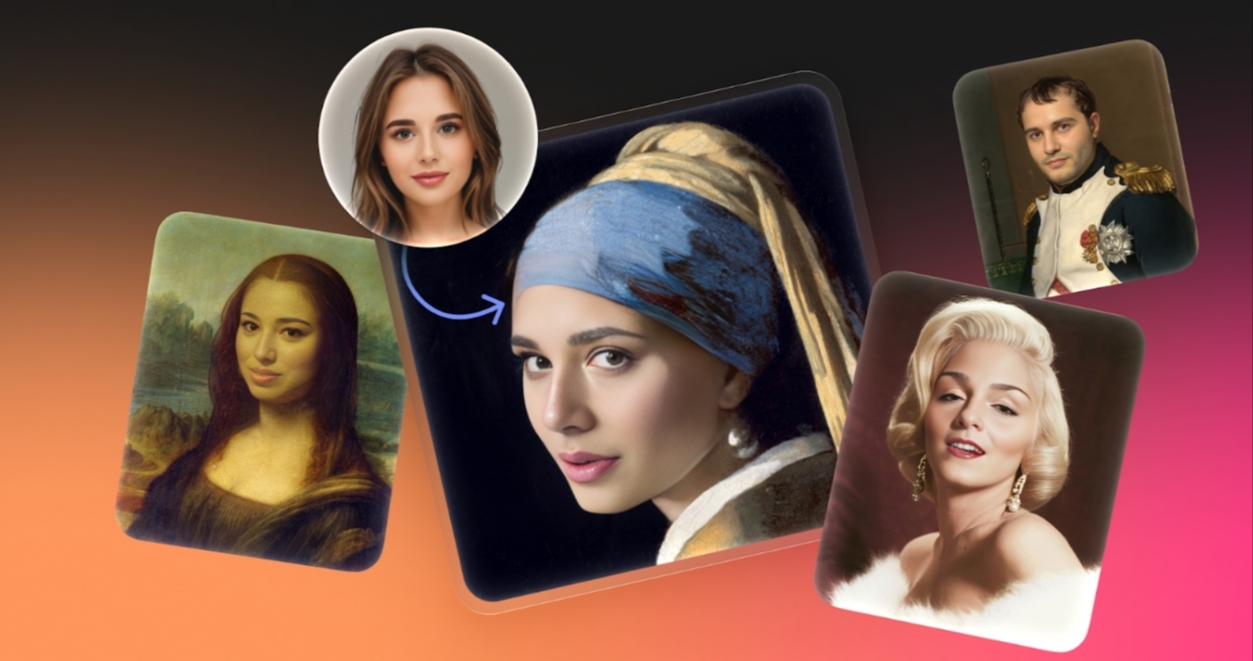
Face Swapper is a browser-based tool that allows users to replace a face in a target image or video while maintaining the original pose, lighting, and scene context. In controlled testing, it produces clean, review-ready outputs suitable for web and presentation formats with minimal retouching. While it works well for standard scenarios, large print and complex hair require additional attention. The interface is user-friendly, predictable once inputs are standardized, and stable for short videos when framing remains consistent.
What the System Actually Does
The service identifies facial landmarks on the target, estimates camera and head orientation, and renders a new identity that follows the original pose and expression. Hair, clothing, and background remain from the target unless masked. The output is a composite that should be graded like any normal photograph: adjust white balance, apply subtle HSL adjustments to skin tones, and perform edge cleanup where necessary.
Where It Fits in a Real Pipeline
- Concept exploration for campaigns and storyboards
- Rapid casting experiments without reshoots
- Anonymization for internal decks where consent and policy allow
- Social visuals and thumbnails that need quick iterations
- App prototypes that demonstrate identity replacement features
This tool works alongside other Icons8 utilities such as Background Remover, Smart Upscaler, and Ouch illustrations. Keeping assets within one ecosystem reduces export friction and version drift.
How to Get Reliable Quality
Inputs
Use sharp, well-lit source faces with neutral expressions. Avoid extreme angles for the source if the target is frontal. For the target, fix exposure and color before the swap to avoid reprocessing later.
Processing
Upload source and target. Confirm the right face is selected when a frame has multiple people. Run the swap. Review at 100% zoom. If you see seams at the hairline or glasses, plan a short masking pass.
Output Care
Export to PNG or TIFF for editing. Perform color and tone adjustments, then upscale if needed for print sizes. Sharpen only after scaling.
Strengths Observed in Testing
- Alignment is robust on head and shoulders portraits
- Expression transfer is stable for neutral to slight smiles
- Edge handling is conservative, reducing halos near ears and hats
- Indoor lighting adapts well without heavy grading
- Short video clips maintain identity across frames when camera motion is moderate
Known Weak Spots and Fixes
- Mixed lighting in street scenes can push skin toward green or magenta. Correct global white balance, then fine-tune reds and oranges.
- Complex curls and backlit hair can show a faint seam. Feather the mask and add a soft brush pass along the rim.
- Wide open smiles can look synthetic. Choose a closed mouth frame or darken the inner mouth slightly to reduce the plastic look.
- Extreme wide angle targets distort facial proportions. Apply lens correction before the swap.
Role Based Playbooks
Designers and Illustrators
Lock a visual direction before booking talent. Replace a placeholder with a client-approved identity to preview art direction and copy placement. For illustration work, photo bash a reference face to fix proportions before painting.
Students
Practice visual storytelling with clear documentation of consent. Treat sources like stock images. Cite origins and add release notes.
Marketers and Content Managers
Create controlled A and B tests where only the subject changes. Hold layout, copy, and background constant to isolate the variable.
Photographers
Plan compositions with stand-ins. Use swaps to validate concept fit. Do not present a swapped frame as documentary truth. Be explicit in captions and usage notes.
App Developers
Prototype identity replacement features. Queue requests, cache intermediate frames for clips, and anticipate rate limiting. Surface clear guidance on consent inside your UI.
General Users
Create personal postcards or memes within legal and ethical boundaries. Never impersonate someone or imply endorsements.
Mid Article Reference
When you need a quick jump back to the tool, this is the bookmark to keep: face swap ai
Ethics, Policy, and Risk
Consent
If a face is identifiable, you need permission. For minors, you need a guardian’s permission. Classroom use does not change this.
Deception
Avoid contexts that can mislead the public. Commercial ads, politics, and news demand disclosure and often formal review.
Rights and Licenses
Many jurisdictions recognize rights of publicity. Stock libraries rely on model releases to manage this. Confirm that both your source and target allow the processing you plan. Save the paper trail.
Privacy and Data Handling Questions to Ask Vendors
- How long are uploads retained and can the user delete them on demand?
- Where is data processed and stored?
- Who can access uploaded content and under what controls?
- Are separate terms available for schools and enterprises?
Icons8 publishes product-level information on handling and deletion across its suite. For formal procurement, request a data processing addendum and confirm details such as encryption at rest and regional storage.
A Repeatable Workflow
- Curate a folder of approved source faces with written releases. Label each file with identity, date, and scope of consent.
- Pre-grade targets. Set white balance and exposure. Crop to final framing.
- Run three variants per asset. Select on a contact sheet to reduce bias.
- Retouch edges, check teeth, and match skin tone to the scene. Work at 100% zoom.
- Save three versions. Original, swapped base, and graded final. Keep notes on license and consent.
Quality Gate for Teams
Score five areas from one to five. Alignment. Texture realism. Lighting consistency. Edge quality. Identity believability. Ship only assets that meet a minimum composite score set by your team.
Integration Patterns
- Design tools: Move PNG or TIFF to Figma, Photoshop, or Affinity. Keep masks editable.
- Video tools: Conform in Premiere Pro, Resolve, or Final Cut. Use matched frame rates to avoid resampling artifacts.
- Asset managers: Tag outputs with consent state and license scope so audits are painless.
Performance Profile From Hands on Trials
- Social resolution portraits processed in seconds on a typical connection
- Clips under thirty seconds returned quickly enough for iteration
- Outputs arrive in standard sRGB, which simplifies web delivery
Troubleshooting Quick Sheet
- If the angle feels wrong, pick a source that matches the target orientation
- If hair shows frizz in backlight, paint a light rim mask and add a small feather
- If edges look crunchy, review at 100% and soften the composite boundary
- If the mouth looks uncanny, prefer frames with lips closed or lower the brightness inside the mouth region
Accessibility and Inclusion Notes
Use diverse, consented sources. Avoid stereotypes in concept notes. Provide context and disclosure when publishing examples or tutorials.
Compliance Checklist for Organizations
- Releases on file for all faces used
- Written retention and deletion policy
- Classroom or enterprise terms, where applicable
- Versioned exports with audit trails
- Style guide for disclosure when swaps appear in public material
Frequently Asked Questions
-
Is this a replacement for a photoshoot?
No. It is a fast way to test casting, mood, and layout before committing to production. -
Can I use the result in paid ads?
Yes if your licenses and releases allow it and if the ad platform accepts this type of modified content. Disclose where required. Confirm policy with the platform and your legal team. -
Does it work on group shots?
It can, but the error rate rises with occlusions and non-frontal faces. Swap one subject at a time and inspect edges closely. -
How do I handle education use?
Obtain consent, prefer anonymized examples, and work under institution terms that explain retention and deletion.
Closing Assessment
Face Swapper is practical for everyday production. It moves fast, handles common cases well, and rewards disciplined inputs. Treat it like any other compositing tool. Plan the shot, control the light, respect consent, and grade the result. Do that and your swaps will pass review without drama.

Post a Comment for "Icons8 Face Swapper: The Practitioner's Field-Tested Guide"
Post a Comment